
How to improve your code quality efficiently?

Quick Summary

Code quality is one of the checkboxes every tech leader or software engineer is concerned about. Low-quality code isn’t just an inconvenience—it’s a business risk. It can lead to security vulnerabilities, endless bug fixes, and, worst of all, dissatisfied users who may take their grievances elsewhere. By ignoring code quality, you are putting your reputation at stake.

So, how do we measure code quality? How do we ensure it remains a priority despite tight deadlines and shifting priorities?

In this blog, we will dive deep into how one can measure code quality. The practical tips and examples to improve the quality of code.

What is Code Quality?

Code quality refers to the attributes and characteristics that make code effective, efficient, and maintainable. The hallmark of exceptional software lies in its adaptability to the organization’s evolving needs. Whether adding, removing features, or refining capabilities, the ability to consistently provide value hinges on maintaining superior quality, sprint after sprint, day after day.

While there is no definitive checklist, as the specific requirements may vary across organizations and teams, there are several broad factors that distinguish good quality code from poor quality code.

  1. Readability: Good quality code is easy to read and understand. It has clear naming conventions, proper formatting, and well-structured logic.
  2. Modularity: High-quality code is modular. Separate concerns are logically divided into reusable components, making it easier to maintain and extend.
  3. Efficiency: Quality code is optimized for performance, resource usage, and scalability. It can handle increased workloads and data volumes.
  4. Testability: Good code is designed with testability in mind. It allows for comprehensive automated testing to catch bugs and regressions early.
  5. Security: High-quality code follows secure coding practices, protecting against vulnerabilities and potential security threats.
  6. Documentation: Quality code is well-documented. It has clear explanations of its purpose, functionality, and usage, aiding future development and maintenance.
  7. Consistency: Good code adheres to established coding standards, conventions, and best practices, ensuring consistency across the codebase.
  8. Maintainability: Quality code is easily maintainable. It has a clean design that allows for future modifications and enhancements without introducing technical debt or breaking existing functionality.

How to Improve Code Quality?

To best gauge code quality is to integrate quality discussions into team dynamics. During planning, monitor estimations with intricate explanations or inflated timeframes; they may signal challenging code areas needing attention. Consider if refactoring is overdue. Assess recent feature launches for lessons learned. Address unexpected complexities and explore strategies for mitigating such issues in the future.

1. Follow Coding Conventions

Enhance your code quality by adhering to coding conventions specific to your programming language.

Coding conventions are standardized guidelines that promote consistency and readability in code. Consistently following these conventions improves code maintainability and reduces the likelihood of introducing software defects.

By embracing established naming conventions for variables and adhering to other language-specific guidelines, you ensure your code is high quality and easily understandable to other developers. Remember to consult the relevant coding conventions for your chosen programming language to maintain consistency and adherence to best practices.

2.Write Automated Tests

Automated tests play a crucial role in maintaining code quality and confidence in changes made to the codebase. Benefits include:

  1. Early bug detection: Catching bugs early saves time and effort, enhancing overall code quality.
  2. Confidence in changes: Automated tests ensure that changes don’t break existing functionality, allowing for confident modifications.
  3. Speed and efficiency: Quick and efficient test execution speeds up bug detection and code verification.
  4. Reduced manual testing: Automation reduces manual testing efforts, freeing up resources for other tasks.

To maximize effectiveness, cover relevant scenarios and edge cases thoroughly. Writing tests before code clarifies requirements and ensures code alignment with expectations.

3. Use Version Control

Version control is indispensable for managing code changes effectively. Version control monitors code changes over time, facilitating easy rollback to prior versions when needed. It also allows multiple developers to collaborate on the same codebase concurrently, avoiding conflicts and data loss.

Version control enables concurrent work on the same codebase, fostering teamwork and productivity. It provides a safety net for codebase recovery in case of accidents or errors.

Git, among other systems, is widely used. Embrace best practices like branching, descriptive commits, and regular merges for optimal version control utilization.

4. Refactor your code regularly

Refactoring involves restructuring code without altering its behavior to enhance readability, efficiency, and maintainability. Benefits include:

  1. Improved readability: Simplifies code for better comprehension and maintenance by other developers.
  2. Increased efficiency: Optimizes code, reducing runtime and resource consumption.
  3. Enhanced maintainability: Streamlines future code modifications, saving time and effort.
  4. Reduced bug risk: Enhances code reliability, minimizing the likelihood of errors.

Key considerations for successful refactoring:

  1. Write automated tests: Ensure code functionality remains intact by testing before and after refactoring.
  2. Make small, incremental changes: Minimize disruption and facilitate bug detection by refactoring in small steps.
  3. Document changes: Clarify modifications for better understanding and collaboration among developers.

5. Use Code Reviews

Utilizing code reviews is a crucial process where developers evaluate each other’s code to enhance code quality. Benefits include:

  1. Improved code quality: Identifies bugs and enhances adherence to standards.
  2. Enhanced collaboration: Encourages teamwork and communication among developers.
  3. Increased knowledge sharing: Facilitates the exchange of best practices and expertise within the team.
  4. Reduced bug risk: Early bug detection enhances overall code reliability.

Key principles for effective code reviews:

  1. Foster open feedback: Create a supportive environment for constructive criticism.
  2. Focus on code, not individuals: Keep feedback focused on improving code quality.
  3. Embrace teamwork: Encourage participation from multiple developers to enhance code collectively.

6. Use Code Linter

Employing a code linter automates checking code against project or company coding conventions, flagging deviations as warnings. While developers often prioritize speed over quality during development, these warnings, if left unchecked, can snowball into significant issues. Linters swiftly identify and highlight these errors, enabling prompt resolution and preventing the accumulation of technical debt for your team.

When leveraging a linter, consider the following:

  1. Select an appropriate linter for your language, ensuring compatibility.
  2. Customize linter settings to enforce specific coding styles or identify particular issues.
  3. Integrate the linter seamlessly into your development workflow for automatic code checks.

How AI Coding Assistants can help improve code quality?

AI coding assistants use artificial intelligence to help developers write code more efficiently and accurately. The code assistants, powered by large language models, offer code suggestions, help fix bugs, refactor code, and more. Developers can thus write codes quickly and efficiently and be more productive and efficient in building products or fixing issues.

Some of the top AI Code Assistants include:

1. GitHub Copilot

Leveraging the advanced GPT-3.5 model, GitHub Copilot offers remarkable speed and precision. Its latest iteration introduces features such as an AI chatbot, inline chatbox, code generation, autocomplete, CLI autocomplete, and a variety of GitHub-based functionalities, all aimed at simplifying code search and comprehension, thereby boosting developer productivity.

2. TabNine

TabNine is the premier AI coding assistant, emphasizing privacy, security, and compliance. In addition to offering code completion and debugging, it features a real-time chat function for accelerated code writing. Additionally, it swiftly handles unit testing generation, code refactoring, code comprehension assistance, and documentation generation.

3. Replit AI

Replit AI is a cloud-based IDE leveraging artificial intelligence to improve development. While certain AI features are free, access to the full suite requires a subscription to Replit Core. Replit Core offers users unlimited AI chat responses, advanced AI models, supplementary features, and unrestricted private projects.

4. CodeGPT

CodeGPT, a VSCode extension, is a dependable tool that enhances coding efficiency through AI chat assistance, auto-completion, code explanation, error-checking, and more. It facilitates using diverse AI models from various providers, enriching the coding experience.

5. DataLab AI

DataLab AI Assistant, a cloud-based Jupyter Notebook, leverages AI technology to support developers in insights generation, code writing, debugging, and auto-completion. Within seconds, it identifies errors and offers solutions, drastically reducing the time required for tasks such as generating comprehensive data analysis reports.

Enjoy the process!

Assessing code quality can be challenging due to its subjective nature. Lowering complexity through various means enhances quality. Though quality coding demands more initial time and effort, early investment minimizes maintenance costs and bug fixes, reducing technical debt.

While achieving bug-free code is unrealistic, adhering to the outlined process will undoubtedly enhance your team’s code quality. As we refine our products with evolving user insights, we must continuously refine our code management strategies.

 

Mastering Web Application Security: A Comprehensive Guide

Quick Summary

The necessity for strong cybersecurity measures becomes important as we increasingly depend on web-based services for key operations and communicating sensitive information. Cyber threats are constantly evolving, posing significant risks to sensitive data, user privacy, and the overall integrity of digital assets. The blog delves into the fundamentals of web application security, exploring common vulnerabilities, best practices for mitigation, and strategies for building robust defenses.

Security Flaws in Commonly Used Web Applications

Flaws In Injections

Attackers may exploit injection issues in online applications by inserting malicious data into vulnerable database tables or filesystem locations. The result might be anything from a simple data leak to full-on arbitrary command execution. SQL injection, OS command injection, and LDAP injection are all examples of common injection attacks.

Authentication Breach

When an adversary gets access to a system using stolen credentials, the system’s authentication mechanisms have been compromised. Weak password restrictions, poor session management, and authentication issues are all potential causes. Password requirements that are both strong and mandatory, as well as multi-factor authentication, may help reduce these dangers.

Disclosing Private Information

When private information is not safeguarded properly, it is said to be “exposed.” Credit card numbers and other personally identifiable information may be at risk if this vulnerability is exploited. Encrypting data while it is in transit and stored is a necessary precaution against this.

Lack of Access Control at the Function Level

When an application fails to enforce necessary permission checks for certain functions or resources strictly, this is known as a missing function level access control vulnerability. Because of this, malicious actors may be able to circumvent security measures. Proper authorization and access processes must be implemented.

Inadequate Security Settings

Misconfigured or insecure settings, such as unpatched software, unused pages, or folders with inappropriate permissions, might leave a system vulnerable to attacks. Attackers may use these openings in security as a springboard for further assaults or the gaining of illegal access. This weakness may be mitigated by doing regular security audits, using a patch management system, and using safe configuration practices.

Cross-Site Scripting

When an attacker inserts harmful scripts into online sites that other users visit, this is known as cross-site scripting (XSS). This may provide the attacker access to the victim’s private information, including login credentials or session cookies. Preventing XSS attacks requires using proper input validation and output encoding methods.

Unsafe Direct Object References

Direct Object References (DOR) vulnerabilities occur when an application’s URLs or parameters reveal sensitive information about the application’s internal implementation, such as the location of database files or keys. This is a vulnerability that attackers may use to steal information or cause harm. This risk may be reduced using appropriate access restrictions, secure indirect object references, and input validation.

Cross-Site Request Forgery (CSRF)

When an attacker manipulates a victim’s web browser to send a request to the target application, the vulnerability is called Cross-Site Request Forgery (CSRF). This may lead to unauthorized changes to the user’s password or financial transactions being processed in their name. Protecting against CSRF attacks requires request validation and the use of CSRF tokens.

Using Vulnerable Third-Party Components

Web applications often use libraries, frameworks, and plugins developed by others. However, there is a chance that these parts have flaws that attackers may exploit. To reduce the possibility of exploitation, it is essential to update and patch these components regularly and monitor their security state.

Invalid Forwards and Redirects

When an application sends a user to a new page without verifying the correctness of the destination URL, it is said to have performed an “unvalidated redirect” or “forward.” Attackers may manipulate this redirection to send visitors to malicious websites where they can be subjected to phishing attempts or have their personal information stolen. This risk may be reduced by the use of proper input validation and redirect URL validation.

10 Best Practices to Secure Your Web Applications

Careful documentation of all Software Changes

Maintaining the safety of your online application requires careful documentation of all software modifications. Developers add new frameworks, libraries, and features to your project as it matures and adapts. But with sufficient documentation, especially in third-party libraries, it becomes easier to pinpoint the origin of security breaches or data infringement situations.

You can keep track of all the times your software has been updated if you document all of those changes. This material helps keep tabs on security flaws, spot threats, and put in place preventative measures. The ability to rapidly identify the library or feature responsible for an issue is a huge boon to effective problem-solving. Improve your web application’s security posture, lessen the blow of security events, and keep your company’s important data safe by keeping meticulous records.

Always Use Encryption

Encrypt all data sent between your server and your users’ browsers using SSL. Even if man-in-the-middle attacks may be thwarted by using HTTPS, further precautions should be taken. Users’ data is more protected when encrypted, even if a hacker gains access to the server. Your data is protected from malicious server administrators or former workers thanks to encryption and hashing. When sensitive data is encrypted, it can’t be deciphered even if someone gains illegal access to the system.

Using Penetration Testing

When testing for security, penetration testing is crucial. Testing specialists play the part of hackers in simulated attacks, trying to get into your system in various ways (including code flaws and physical entry points). Effective vulnerability identification is made possible through penetration testing, which also produces a comprehensive report for use in subsequent security audits and data breach investigations. It simulates the skills and expertise of a genuine hacker by investigating various entry points, such as cloud access.

If you don’t know what you’re doing when it comes to conducting a security audit, you may choose to hire a professional who specializes in penetration testing. By looking at your web app from the outside, you might find vulnerabilities your team may have missed.

Set Your Cookies

If you must use cookies on your site, make sure they don’t include any private data. Never save login credentials or other private information to a cookie since this might be used maliciously by hackers. Also, make sure your cookies have a proper expiry date.

They shouldn’t be valid forever but for a set period, like one month. The security of the online application is improved, and legitimate users are the only ones who can access it if users are required to renew themselves every few weeks. Last, encrypt all cookie data to make the system more secure and prevent illegal access to user information.

Make Use of Real-Time Tracking

To swiftly identify security issues, implement real-time monitoring tools. Real-time monitoring lets you discover and respond to intrusions immediately, while traditional breach detection might take months. You can monitor employee computer use and detect security breaches and suspicious activity using this program. By keeping a careful eye on worker behavior, you can ensure that security standards are being maintained and quickly identify the root cause of any system breach, allowing for prompt repair.

Train Your Staff

Up to ninety per cent of security failures may be traced back to some human mistake. It’s critical to educate workers on the importance of safe software practices and the steps they may take to prevent data breaches. Give lessons on data security best practices, such as how to deal with sensitive data, spot phishing efforts, and react to a data breach. Create transparent security policies to regulate employee conduct. You may reduce the chances of security incidents and promote a security-aware culture by emphasizing prevention via training and education.

Update Your Web App Regularly

Keep your web app, as well as any external services or libraries it relies on, up-to-date regularly. Outdated third-party software is a common target for hackers. Take a look at your docs to see which libraries you’re using so you can cut the fat. Bring the rest of the libraries up to their most recent stable releases. Create a plan for the upgrade, considering any compatibility difficulties that may arise. While it may be inconvenient, keeping your system up-to-date is the best way to prevent known security flaws and keep your data safe.

Get a Web Application Firewall and use it

Use a WAF to monitor and control all incoming and outgoing HTTP traffic. A WAF provides a barrier between your databases and harmful requests. It examines incoming data, identifies anomalies, and stops assaults before they ever begin. For full coverage, choose a top-tier WAF that can identify threats like SQL injection and cross-site scripting. WAFs are helpful since they don’t need any changes to the code itself.

Identify potential entry points

Determine which parts of your web app are the most sensitive and give them top priority for protection. Sort modules into categories according to how open they are to assaults. Login and purchase pages are two customer-facing modules that must be prioritized. Serious modules handle sensitive data about the business or its customers. Even though a normal module doesn’t have direct access to important data, it must be checked regularly. Modules may be organized in groups such that resources are directed toward the most at-risk locations.

Permission Management

Limit software access based on workers’ roles and responsibilities as part of a well-managed permissions system. Make a grid of access levels that corresponds to the responsibilities of their position. There are two benefits to taking this route. First, if an employee’s credentials are stolen, access is limited to prevent admission. Second, it reduces threats from inside by limiting access to the information and features that workers need to do their jobs. Web application security may be improved by implementing access restrictions and swiftly removing authorization when an employee departs the firm.

Final Thoughts

Prioritizing web application security is crucial as cyber threats continue to evolve. By implementing the security measures outlined in this guide, businesses can mitigate risks, protect sensitive data, and safeguard their reputation. From secure coding practices to regular vulnerability assessments, every step taken towards enhancing web application security contributes to the overall resilience of an organization’s digital assets.

However, ensuring robust security for web applications requires ongoing vigilance and expertise. As a top web development company, we understand the importance of building and maintaining secure web applications. Our team of seasoned developers is well-versed in the latest security protocols and best practices. Partner with us to safeguard your web applications against potential threats and ensure peace of mind for your business and users. Contact us today to discuss your project and secure your digital assets effectively.

Serverless VS Containers: Ideal Application Architecture

Quick Summary

Many businesses are investigating ways to quicken the pace at which they create their IT infrastructure to stay competitive. The short time frames necessary for this transformation are made possible by rapid and reliable deployments to the most modern systems.

Serverless functions and containers are the most popular ways to host these applications. What are they, how do they vary, and how do you choose which one to use? In the blog, we’ll examine the key distinctions between serverless computing and containers and lay out some criteria you can use to make an informed choice for your next project.

What are Container-Based Programs?

Containers are small and lightweight virtual computers or deployment packages. They make it possible to encapsulate all the required components for running your program in a single file. To execute an application in a container like Docker, the program and its prerequisites must first be packaged. Then, you may use any server to execute these containers.

An image (like a Docker image) is a template used to generate a container, which is then used to execute an application. A text file called a Dockerfile includes instructions on constructing a Docker image and may be used to produce images. You may use this picture to make as many containers as you want, each with its settings and specifications. They may then be executed remotely using a container runtime technology such as Docker Engine without additional libraries or tools.

Containers are great for deploying to cloud platforms like AWS, GCP, and Azure because they provide a secure, isolated space for your code. To deploy and manage containers on a large scale, you may utilize a container orchestration platform like Kubernetes. They are portable from one server to another without causing any compatibility concerns, making them ideal for cloud installations.

What are Serverless Applications?

In a serverless architecture, there are no persistent states for the program to access. Function as a Service (FaaS) is used in serverless applications since it can bundle and deliver code as a standalone executable. The program reacts to triggers like an S3 bucket receiving a file upload or an HTTP request being received.

A serverless application eliminates the need to set up and maintain physical servers. The cloud service provider’s servers run the program and turn it off when they’re done. In addition to AWS Lambda, Azure Functions and Google Cloud Functions are more FaaS options. Since there is no need to manage servers or scale apps, serverless applications may greatly simplify deployment and management.

This method is less complicated to maintain than containerization, and it may save money as you only pay for the time your code is being executed. Serverless installations, although convenient, have some limitations.

Comparing serverless computing and containers

Serverless apps and containerized ones have several commonalities. However, there are also notable distinctions.

In most circumstances, developers may forget servers and infrastructure using serverless functions or containers. Separate from the guest application and operating system, the host hardware and operating system are isolated in their partition. Serverless services and containers eliminate the need for DevOps teams to worry about the underlying hardware.

  • Both types of hosting may grow with your needs by adding resources like a faster CPU, more RAM, or a more robust network.
  • This is not the case when containers are used with hardware located inside a company’s own data center. In such an environment, hardware provisioning is often performed by a separate infrastructure team using manual processes.
  • Traffic- and demand-based scaling is also conceivable. The open-source orchestration system Kubernetes can instantly grow containers horizontally. Similarly, many FaaS solutions can autonomously scale up in response to changes in key metrics like the volume of requests made to the underlying application.
  • CircleCI, one of the leading continuous integration solutions, is compatible with serverless functions and containers. A fresh container image or serverless function may be deployed to your infrastructure provider automatically once a build is successful.

How are containers different from serverless architecture?

Despite their similarities, the two technologies are different enough to be used for different purposes. Both serverless architectures and containers are elastic, allowing dynamic scaling to meet fluctuating demand. However, to grow automatically depending on predetermined criteria, DevOps teams that use containers need container orchestration software such as Kubernetes. Meanwhile, this functionality is often included in many FaaS systems.

Small, specialized modules with a particular purpose are typical examples of serverless functions. They often only last a few minutes or even seconds if they are directed towards the public. Containers, however, are ideal for larger, longer-running, or multi-purpose applications.

Storage containers are used for:

  • Transitioning away from on-premises hardware and software
  • Adapting a single-purpose program to run on the cloud
  • Creating a program that can function for several hours

A major distinction is that your provider will only charge you for the period your serverless activities are active. However, the cost might increase if you maintain many container instances active at all times.

If your software is lightweight and would function better as a serverless app, you might be wasting a lot of money and having a negative influence on the environment.

It’s important to note, however, that serverless options for containers do exist. You are only charged for the time your containers take to complete their run on the AWS Fargate platform.

Another distinction is that serverless functions raise the issue of vendor lock-in to a greater degree. The code required to interface with related services might quickly bind you to a certain ecosystem.

In contrast, containerization facilitates vendor agnosticism. Because of this agnosticism, containers can run in any language, but serverless apps can only run in a few. The languages offered by each service provider are different.

When Developing an Application, Should You Use Serverless or Containers?

It is important to think about the many elements that affect these cloud development services when selecting the architecture for constructing your application. However, the scale and structural integrity of the building should be your top priorities. The serverless architecture is well-suited for separating tiny applications into independent services. However, containerized architecture is the better choice for a bigger and more complicated application. Let’s examine the impact of these variables on each application.

Building and Testing Software Applications

The demand for developers to provide high-quality code is particularly intense during the development of an application. Working with new technology and learning how it works compounds the difficulty. The developer’s proficiency is measured by how fast they can get it up and running, how easily they can make modifications, and how easily they can spot faults.

Applications Without a Server

Serverless apps are simpler in every way compared to their containerized counterparts. These programs are written in a single language but aren’t binary-compiled. Instead, developers will group them to form a function. The cloud development service provider handles server installation and management, so you don’t have to. Even while working locally, it lets you give your whole attention to coding and testing.

Software Packaged in Containers

Because developers may use whatever language or framework they choose, container-based app development is far more efficient. Then, the container app compiles it into a binary to run in any setting with the same dependencies. They are more portable, so you can move the process along more quickly to where it needs to be (the production environment).

Scalability and efficiency

The scalability of a system is its capacity to handle more users or higher volumes of traffic without degrading performance. The serverless method is popular, and many companies are also experimenting with containerized apps triggered by serverless operations.

To initiate container data processing, developers may utilize a serverless function as elementary as a file upload. More control may be exerted over the underlying infrastructure, as well as more scalability, lower costs, and the possibility to use bespoke libraries when a hybrid approach is used.

Applications Without a Server

Developers can maintain scalability and performance even as demand grows using a serverless platform. However, there are more viable options for programs that need instantaneous results. Serverless application performance may be slower than that of dedicated servers. This occurs because they are run on demand by a cloud development services provider.

Software Packaged in Containers

Compared to their serverless equivalents, applications built on container technology have more scalability. Why? Because they can swiftly scale by adding or removing containers as needed. In addition, they provide more compartmentalized settings, so the failure of one container won’t affect the others. This is an advantage for containerized apps versus serverless ones.

Implementation and Design

As was previously said, the deployment is profoundly affected by the architecture you choose. Programming is prioritized above managing servers in a serverless architecture. The code is then packaged as a serverless function, and the runtime automatically calls it whenever a request is received. Containers package programs in a way that isolates them from their supporting environment. Both architectural types have their unique deployment strategies.

Applications Without a Server

Serverless apps run on the IaaS paradigm of cloud computing. The cloud service provider here provides a VM on a pay-per-use basis. The onus is entirely on the client to provide workloads, manage the VM, and grow it as necessary. The client needs to be more informed about the availability of the servers. Serverless computing makes it possible to charge customers for the resources they use by how long and how often their applications operate.

Applications that Use Containers

Containerized apps may run on physical servers, virtual machines, dedicated container instances, or even be hosted by a third party. Their engines need a container that specifies the necessary configuration and data in the form of an image. Web servers, database servers, and application servers are some of the many dependencies that may be included in a container image. However, containers are stateless, meaning that when they are shut down, they lose all of their contents. However, they shine when used for stateful applications, which need persistent data storage and retrieval.

Safety and Portability

When deciding on an architecture, portability should be a top priority. Faster integration and accessibility with each service are crucial when utilizing numerous services simultaneously.

Applications Without a Server

Avoid vendor lock-in by routing your endpoints and URLs via a single domain. It is still risky to integrate FaaS into a DevOps framework while moving your infrastructure. There’s also a good chance your team won’t remember who created what function and whether or not it’s still being used.

Applications that Use Containers

It is less hassle to relocate container-based apps since their code may be packaged and deployed independently. As a result, they provide great mobility and demand little in the way of time or energy. Additionally, containers enable you to spin up new software versions when time-to-market is tight and innovation is paramount. Microservices are a great way to break apart monolithic apps while you’re just getting started. However, upgrading container hosts, images, and engines requires careful orchestration due to interdependencies.

To Sum Up

Is there ever a definitive resolution to the argument? We don’t think so. The cases for serverless computing and containerized application frameworks are squared away. Which one you choose to use depends on the kind of app you’re building and its intended use. While containers provide portability and segregation, serverless allows for elastic scaling with little overhead.

Similarly, because serverless computing is event-driven, it is the optimal choice when just temporary functionality is required, such as when creating an API server. An AI program, for instance, needs little more than on-demand access to computational resources. Container design, on the other hand, is perfect for developing scalable, always-on, multi-tiered systems.


Mastering Cloud Cost Optimization: Strategies for Maximizing Savings

Quick Summary

As businesses increasingly migrate to the cloud, managing and optimizing cloud costs has become critical. While the cloud offers unparalleled flexibility, scalability, and agility, unchecked cloud usage can lead to unexpected expenses and budget overruns. The blog explores strategies, best practices, and tools to help you maximize cost savings and optimize your cloud spending effectively.

What Is Cloud Cost Optimization & Why It’s Important?

Optimization of cloud costs guarantees that each workload or application receives the optimal amount of cloud resources at the lowest possible cost. Cloud investments are optimized and meet business needs by balancing performance, cost, compliance, and security.

Optimization of cloud costs is dynamic, adapting to new application needs and evolving cloud service offerings. Optimizing cloud costs needs in-depth measurements, analytics, and automated solutions because of the vast complexity of cloud settings.

Optimization in the cloud helps save costs by revealing idle assets and neglected software. It’s important to make sure your expenses match your strategic plans.

Cloud Cost Optimization: Key Questions For Cutting Expenses

Unexpected spending and expenses in the cloud can be controlled and avoided with planning.

  • How can we assess the total cost of ownership of our cloud infrastructure and effectively allocate funds at the department, division, and corporate levels?
  • How will we manage the provisioning of cloud resources and the subsequent tracking and management of costs?
  • How can we avoid overpaying and under-provisioning?
  • What KPIs will we be monitoring? Services, capacity, use, performance, and availability may all add to the total in addition to your monthly cloud charge.

16 Methods for Minimizing Cloud Computing Expenses

You may reduce your cloud computing expenses by following these guidelines.

1. Review Pricing and Billing Information

Cloud service providers often provide detailed invoicing information that includes service prices. Using this data, you can zero in on high-priced regions and cut costs immediately. Evaluate and prioritize services and processes that consume a lot of money. When you have a firm grasp on how much your cloud service costs, you can cut down on unnecessary expenditures and maximize your return on investment.

2. Set Budgets

Please make sure everyone involved in a project is aware of its objectives and financial constraints to keep expenses in check. Instead of picking a figure at random, encourage dialogue amongst engineering heads, product managers, and upper management over budgetary needs.

The bare minimum is needed to ship items and implement features as designed. Check whether it’s a paid plan or a trial version first. Compare these needs with others, such as speed and resilience, as you design and build.
Establish a monthly spending limit for cloud computing strategy planning. Your organization’s specific circumstances may need a different spending plan. Having a set budget is essential for cost management and financial planning.

3. Identify Unutilized Resources

Finding detached and idle resources is a simple way to reduce cloud service expenses. It’s very uncommon for administrators and developers to set up a temporary server for a specific purpose and then neglect to remove the server once it’s no longer needed. Another possibility is that storage associated with terminated instances still needs to be removed because the administrator forgot.

When businesses engage in such procedures, their AWS or Azure costs go up because of the inclusion of charges for unused resources. A cloud cost optimization technique may assist in finding resources that aren’t being utilized or connected, allowing you to get rid of them and save money.

4. Identify Idle Resources

Finding and merging unused cloud computing resources is another strategy for cost reduction. Cloud service providers will still charge you for any unused resources. Finding and combining these tools will help you maximize savings. If your CPU usage is 10%, but your service provider charges 100%, you waste a lot of money.

To save money, you should consolidate whatever unused resources you locate. There is no need to hoard unused assets in anticipation of peak use periods. To increase capacity on demand, you may use cloud capabilities like auto-scaling, load balancing, and on-demand access.

5. Right-Size the Services

Computing services may be right-sized by analyzing their use and adjusting their parameters accordingly. There are a lot of choices for memory, graphics, databases, storage, and throughput, making it challenging to manually size instances.

Recommendations for alterations across instance families may be obtained using right-sizing instruments. As a result, you may save money on cloud services while getting the most out of them.

6. Use Reserved Instances

Reserved instances (RIs) are pre-paid computing instances with substantial cost savings. You may purchase RIs from a cloud provider for one to three years. During this time, you’ll choose an instance type, a certain location or availability zone, and begin utilizing the instance.

In return, many cloud services provide savings of 75% or more. You need to perform the math and make your plans based on your past instance use because of the upfront cost. Similar savings are available via AWS’s Savings Plan offerings, which provide more freedom in how those funds are used.

7. Use Savings Plans

Save as much as 70% on your monthly AWS bill with the flexible pricing mechanism of the Savings Plans. This pricing mechanism, like RIs, provides stable rates for one- or three-year contracts.

8. Leverage Spot Instances

Spot Instances may be purchased at the last minute, unlike Reserved Instances. At AWS auctions, surplus resources are offered at rock-bottom rates. However, these situations could be more consistent since they are in high demand and low supply. Spot Instances are best used for less urgent, less time-sensitive tasks, such as batch processing or temporary operations.

Key service parameters, such as the lead time, shutdown and the maximum period a Spot Instance is permitted to operate, are included in the table below for the most popular cloud providers that provide Spot Instances.

9. Limit Data Transfer Fees

It is expensive to move data to and from the public cloud. When moving data out of a cloud provider’s platform or across regions, the company may impose an “egress fee.” Saving money in the cloud is as simple as limiting your use of data transfers.

Consider the transfer costs of your cloud provider and adjust the cloud architecture to reduce the amount of data sent. Moving on-premises apps that often use cloud data to the cloud, for instance, may cut down on redundant data transfers.

Costs associated with various options for transferring data between the cloud and private data centers should be considered. When deciding between a physical transfer device like the AWS Snowball or the Azure Data Box and a specialized network connection service like AWS Direct Connect, Google Cloud Interconnect, or Azure ExpressRoute, consider the cost.

10. Choose a Single or Multi-Cloud Deployment

Costs might add up for multi-cloud installations, but they’re worth it to prevent vendor lock-in and boost availability. You may save money by buying in bulk from a single provider. It might be time-consuming and educationally burdensome to switch between multiple cloud systems. Consider whether a single-vendor or a multi-cloud setup would better serve your business.

11. Monitor Cost Anomalies

Budgets, AWS cost projections, and cloud spending optimization may all be accomplished through the Cost Management panel. The Cost Anomaly Detection function in the control panel uses machine learning to track expenses and use and spot unusual patterns in those metrics. You may set up alerts that will sound when you go close to or over certain spending limits; then, you can investigate the reason for the anomaly and take steps to eliminate it, helping you stay under your budget.

12. Use Appropriate Storage Options

When it comes to cloud storage, many people turn to Amazon S3. It has almost infinite storage, is simple to use, and integrates well with other AWS and third-party services. However, AWS has many storage tiers with vastly varied prices, so it’s crucial to choose the appropriate tier to stay within budget. S3-Intelligent Tiering may monitor your data’s consumption habits and promote it to the optimal storage tier without your intervention.

13. Optimize Cloud Costs at Each Stage of the SDLC

It’s not enough to construct and release a product before considering the associated costs. All phases of the software development lifecycle (SDLC) should include cost optimization.

14. Identify and Minimize Software License Costs

Cloud service fees mostly stem from spending on software licenses. Managing licenses manually is difficult, raising the possibility of wasting money on unnecessary software licenses. The AWS Marketplace is where you may find Amazon Machine Instances for commercial and public use. You may save costs by using license monitoring software to find unused software.

15. Implement a Cloud Native Design

Get the most out of the cloud’s unique features by upgrading to newer, cheaper cloud-based solutions. You may include auto-scaling in your system’s architecture, for instance, to limit your server costs to those expended.

The Well-Architected Tool advises on how cloud architectures might be improved. When designing your system with cloud-native concepts in mind, you may use AWS’s comprehensive documentation and expertise to save expenses. Organizations generally adopt pre-existing cloud infrastructure rather than building from scratch; therefore, cloud-native design may require direction.

The aims and goals of your firm will determine how you should optimize your design in terms of performance, cost, and other factors. A quick cloud-based DevOps pipeline could not save money.

16. Track Cost Center Spending

There has to be a mechanism to keep tabs on how much money is being spent in the cloud across all of the different teams. Keeping individual AWS accounts for each cost center facilitates accurate accounting. When numerous teams use the same account, it might be difficult to determine who is accountable for certain expenses.

Adopt a uniform system for tracking who owns which cloud resources; for instance, use tags and consistent naming conventions. Tags and labels simplify tracking the provenance and ownership of resources throughout time. Adjust the level of granularity at which reports must be generated (by department or user).

Top Cloud Monitoring Tools

  • CastAI helps in monitoring, analyzing, and optimizing Kubernetes apps. It automates cloud cost optimization through rightsizing, instance selection, autoscaling of resources, and more.
  • Harness is a pre-built cloud cost management module. It improves transparency and resource efficiency.
  • Cloudability collects key data on resource usage to monitor and optimize the cloud. It also provides rightsizing recommendations.
  • Cloudcheckr is the cloud cost monitoring tool. It tracks and monitors key expenses for the applications. Further, it generates reports and creates policy-based automation.
  • Kube Cost is also a cloud cost management tool that monitors resource allocation and generates accurate reports to find cost anomalies.

How to Optimize Cloud Costs as Part of the Software Development Life Cycle?

Planning

You can evaluate your software development requirements to plan the entire process well. It involves assessing systems requirements, cost, architecture, features, etc. Planning helps reduce redundancy and errors, thus, tech debts.

Design and build

In this stage, you can analyze the frontend design, technology stack, APIs, and performance of the cloud software. The analysis helps ensure the app looks and performs and is developed within budget.

Deployment

The development stage includes analyzing the operational expenses incurred in developing the software. It also involves verifying if you get the desired ROI after launch.

Performance and maintenance costs

Monitoring the software is important to keep it relevant to the current trends and technology. You can define metrics to analyze the app performance for updates.

Final Thoughts

Mastering cloud cost optimization is essential for businesses looking to maximize their return on investment in cloud services. By implementing the strategies outlined in this guide and asking the right questions, organizations can identify inefficiencies, streamline operations, and achieve significant cost savings in the cloud.

Cost optimization is an ongoing process that requires regular monitoring and adjustment. Businesses can maintain control over their cloud spending and ensure long-term financial health by continuously evaluating usage patterns, optimizing configurations, and staying informed about cloud pricing models and discounts.

Want to optimize your cloud costs and drive greater efficiency? Contact Upsquare Consulting Services to leverage our expertise and experience in cloud cost optimization. Let us help you navigate the complexities of cloud pricing and maximize your savings. Get in touch today to start saving more on the cloud.

17+ Product Engineering Challenges and Solutions

Quick Summary

What can be the most common product development challenges engineers face? Let us understand them deeply in the blog and find possible solutions to the challenges.

Companies invest in Product engineering to innovate and stay competitive in the long run. The global product engineering services market is expected to grow at a CAGR of 8.8% and reach USD 1,002.9 billion by 2026.

Product managers and engineers will be highly interested to read the blog as they can get relevant solutions to the challenges they might be facing currently.

Common product engineering challenges and possible solutions

Developing a product requires close collaboration between teams and knowledge of current regulations. The products and software nowadays are becoming more complex, and so is the product development process. More complexity has a higher risk of flaws leading to costly recalls.

Engineering and design teams are looking to optimize the product development process and the solutions to current challenges. So, here we are discussing the most prominent challenges and their feasible solutions.

1. Legacy Application Migration

The first product engineering challenge can be migrating from a legacy application to a new platform. The complex process requires engineers to transition to new technologies, procedures, and workflows.

Things that products engineers must care for include-

  • Platform compatibility with new technologies
  • Smooth & no loss data migration.
  • Maintain regulatory compliance
  • Reliability and security of new systems
  • Minimal disruption to business operations.

Solution

We offer complete digital engineering services to help businesses overcome legacy app migration challenges. We assess the legacy systems and identify migration risks and opportunities.

We can create a detailed migration plan for a smooth transition covering critical functionality and risk mitigation. Leverage the benefits of modern architecture and cloud in your valuable legacy business apps with our engineer’s expertise.

2. Ensuring cross-functional collaboration

One of the major product management difficulties is ensuring cross-functional collaboration. Product Managers must leverage excellent communication, coordination, and alignment among various tasks, including design, development, and testing.

Solution – Cross-functional collaboration enables product managers to meet customer expectations and business goals. Instead of siloed teams, open communication, and collaboration offer higher perks. Product managers can establish clear roles and leverage tools like Jira, Slack, and Trello to keep everyone on the same page. It ensures that projects are delivered on time and within budget.

We ensure cross-functional collaboration by bringing together experts from different fields, including development, design, and business analysis. The experts work collaboratively on tools like Jira, Slack, and Trello to provide desired solutions for client requirements.

3. Managing development complexities

Product development is a complex process that requires careful management of various factors to ensure successful delivery. Some key considerations for addressing the challenges involve-

  1. Resource management
  2. Timelines and Budgets
  3. Quality, Scalability, and Reliability of products
  4. Technical challenges
  5. Integrating new technologies

Solution

Upsquare, as a leading product engineering company, understands the challenges associated with product development. We provide comprehensive solutions to help companies overcome these complexities using the most advanced tools and technologies.

By leveraging agile methodologies, such as Scrum or Kanban, Upsquare helps break down development goals into manageable sprints, enabling iterative and incremental progress.

This approach fosters flexibility, adaptability, and improved collaboration within development teams. Our team of product engineers holds expertise in various technologies and domains, enabling them to tackle technical challenges effectively.

We employ rigorous testing techniques to identify potential risks and errors. We rectify all errors, security bugs, or glitches early on to speed up the development process while saving time.

4. Keeping product quality intact

Another product engineering challenge involves ensuring product quality. A product manager must implement a comprehensive quality assurance process during each stage of developing the product.

Solution- Upsquare helps clients maintain product quality with an experienced, skillful, and knowledgeable team of QA experts. The team leverages automated and manual testing to identify and fix defects.

In addition, we leverage continuous monitoring and iterative testing to maintain quality while avoiding issues. We strive to deliver products that go beyond customer expectations.

5. Crafting a visually appealing UI/UX

The product’s UI/UX design should be highly intuitive and engaging. A friendly user interface design enables smoother navigation and higher customer satisfaction. On the contrary, a flawed design leads to frustration and an increased bounce rate.

Solution- Upsquare, with a team of highly creative UI/UX designers, performs thorough user research, prototyping, and testing. We understand clients’ needs and design interfaces that appeal to millions.

We ensure the design delivers a similar user experience across all platforms and devices. Augmented reality is the current trend, and we blend it into product designs very well, creating immersive experiences.

6. Meeting compliance or regulations

Product engineering also involves meeting compliance or regulatory requirements. Business owners may face legal consequences and loss of customer trust. The regulations involve –

Solution- Our experienced team of product engineers is well aware of various compliance regulations. We implement strict design and development practices that adhere to industry-specific standards. We create products that comply with GDPR, HIPAA, PCI DSS, and WCAG regulations.

7. Crafting the right product architecture

The next product engineering challenge involves creating the right architecture. It must be scalable and flexible to meet current and future business needs.

If your product architecture goes wrong, you will face performance issues, slow development, and will also have to invest in more amounts in rework.

Solution- Upsquare offers expert guidance to build the right architecture after a deep study of the project requirements and goals. Our experienced architects and engineers work closely with clients and gather detailed information on the project to design a robust architecture that meets the project’s needs.

We leverage the best practices in software engineering, such as modular design, continuous integration, and delivery. Thus, we deliver scalable and flexible products.

8. Keeping up with technological advancement

Product managers must follow current trends to engineer a product that stays relevant to technological advancement. They can identify new trends and update legacy systems with the modern technologies and frameworks. These practices ensure that the product stays relevant.

Solution- The Product engineering team at Upsquare believes in continuous learning and upgrading. The engineers update them with the latest technologies, frameworks, and best practices. We ensure clients get the best tech solutions for their projects.

9. Data Privacy issues

Data privacy issues refer to concerns and challenges related to the protection and appropriate use of personal data. It involves unauthorized access, misuse, or theft.

Solution- Product engineers at Upsquare follow these steps to avoid data privacy issue-

  • Implement security best practices
  • Comply with regulatory requirements such as GDPR and CCPA, and Secure data storage and transmission.

In addition, we perform regular security audits and implement measures to mitigate arising data privacy threats.

10. Managing project deadlines

Delivering product within deadline is the key challenge all product engineers face. The product manager has to ensure that the team develops the project within a given time frame while maintaining the project quality.

As a product manager, you must ensure that projects get completed within the set time frame while maintaining quality standards. For that, you have to emphasize effective planning, setting realistic timelines, identifying potential roadblocks, and having a flexible approach.

Solution- We understand the importance of timely deliveries and thus, our product engineers follow proven strategies and practices to manage project completion on time.

  • Breaking down the project into manageable tasks
  • Setting realistic timelines for each task,
  • Tracking progress against the plan.

We always keep the clients in loop to get their feedback for immediate changes and to avoid potential delays or risks.

11. Balance short and long-term objectives

Product managers have to balance between immediate project needs and future goals. It involves choosing and prioritizing the features as per customer needs and current market demand.

Similarly, there is a need to identify opportunities for innovation and also ensure that the product aligns with the long-term goals. If a product focuses only on short-term goals, it may not be sustainable for the future.

Solution- The product engineers at Upsquare work closely with clients to understand their business objectives (short and long-term). After a deep understanding of immediate needs and future vision, we develop the product roadmap. In addition, we ensure to build a scalable product that can adapt to changing business needs & goals.

12. Lower Time-to-Market

Clients demand a quality product with lower time-to-market which poses a big challenge for product engineers. Our 12+ years of experience as the leading product development company has given us enough expertise to solve this challenge.

Solution- We use an agile development methodology with more focus on collaboration between teams. In addition, we also ensure to find the bugs and make immediate changes with rapid iterations. We automate the build, testing, and deployment process with pre-built components and libraries with the implementation of CI/CD.

13. Balancing features vs. price trade-offs

The price of the product must balance with the product features to appeal to potential customers. Customers are willing to pay a higher price for a product that offers superior features compared to other products.

Solution- To achieve this, the product engineers at Upsquare conduct thorough market research to understand consumer preferences. Once we know what customers demand, it is easier to plan the product features according to what they like. The pricing involves the cost of development and testing.

14. Understanding market viability

Product managers must identify potential customers, conduct market research and analyze their preferences and needs. The study enables determining a market viable product. When we know what the potential customers demand, we can develop a product that meets the growing demand.

Solution- We develop Minimum Viable Product (MVP) to address market viability challenges. After the MVP launch, we also work on the feedback from customers for further improvement. Thus, it helps minimize risk and maximize profitability.

15. Managing the financial risk

Another product engineering challenge involves managing financial risk associated with the product development lifecycle. Product managers must identify potential financial risks and assess their impact on the product’s success. Based on the assessment, they must implement a risk mitigation product strategy.

Solution- We implement best product engineering practices to help clients to manage financial risk. We leverage advanced analytics tools for real-time monitoring of financial risks to identify and mitigate potential risks. The valuable insights enable the clients to make informed decisions.

16. Catering to the changing customer taste

Another challenge that product engineers face include changes in customer demands and preferences. With time, customer demands and preferences change and a successful product is one that can adapt to the changing needs. However, consumer preferences can shift quickly and that becomes a big product engineering challenge.

Solution- Leveraging data analytics to identify trends and insights can help managers make well informed product decisions. With the right data, engineers can quickly innovate the products to meet evolving needs. They can use future-oriented technologies that are quick to scale.

17. Dealing with resource constraints

The next product engineering challenge is developing the product with constrained resources. Product managers and engineers have to devise a product development strategy that enables them to develop quality products with limited budget, time, and resources.

The challenge is to create innovative products while optimizing costs and managing available resources effectively. The strategy here can be to identify potential bottlenecks and minimize waste to deliver successful products within a stipulated time frame.

Solution- The product engineers at Upsquare hold enough expertise to manage this problem. We use an agile development approach and optimize resource allocation and project workflows. We deliver high-quality products on time and within budget with optimal utilization of resources.

How can Upsquare Resolve your Product Engineering Challenges?

Product engineering requires careful consideration and strategic approaches, from managing complex requirements to ensuring scalability and performance. Product engineering teams must navigate various obstacles to deliver successful and innovative solutions.

The ever-evolving technological landscape, shorter product life cycles, and increasing customer demands further intensify the challenges faced by product engineering teams.

Our expertise in product engineering positions us as a valuable partner for organizations seeking to navigate these challenges and drive innovation.

With our team of experienced engineers, we bring a wealth of knowledge and a deep understanding of the latest technologies and industry best practices.

We work closely with our clients to understand their unique needs, challenges, and goals. We leverage our technical expertise and domain knowledge to develop tailored solutions that address their requirements and drive business value.

Get in touch with us to get rid of the product engineering challenges and get successful products developed.

Agile Testing Methodology- A Detailed Guide

Quick Summary

With a constant change in customer needs and technology trends, developers look for a project management framework that can speed up the development lifecycle and enable rapid deliveries.

Agile testing methodology offers a dynamic approach to software testing that aligns seamlessly with Agile development frameworks’ iterative and collaborative nature.

Unlike traditional testing methods, which often happen at the end of the development cycle, Agile Testing is an integral part of the development process. It involves testing early and, often, ensuring that quality is built into the software from the ground up.

The Agile Testing Methodology stresses close collaboration between developers, testers, and other stakeholders. Testers work hand-in-hand with the development team, providing feedback and identifying defects as soon as possible. This approach helps to identify and fix issues early in the development cycle, reducing the cost and effort required to fix them later.

What is Agile Testing?

Agile Testing follows the rules and principles of agile software development. With agile software testing, developers can test their code continuously and rapidly. Developers get immediate feedback from customers making it quick to make changes. Agile Testing begins at the start of the project with continuous integration between development and testing.

With continuous integration and delivery, agile testing ensures quality throughout the development life cycle. Developers integrate their code changes several times in a continuous integration while every change that passes all tests is automatically released into production with continuous delivery.

What Are the Principles of Agile Testing?

Look at the principles of agile testing:

  • Early and continuous testing: Testers should start testing the software early and should test the software continuously throughout the development cycle.
  • Whole team approach: Each team member (developers, testers, business analysts, and product owners) ensures product quality.
  • Frequent deliveries: Deliver the working software frequently, typically every two weeks.
  • Close collaboration: Maintain a close collaboration between all team members, ensuring everyone is on the same page.
  • Customer involvement: Continuous involvement of customers throughout the agile development process. Their constant feedback at each iteration helps the team make constant improvements.
  • Flexible approach: Teams can change the requirements during the development process as the approach is flexible.

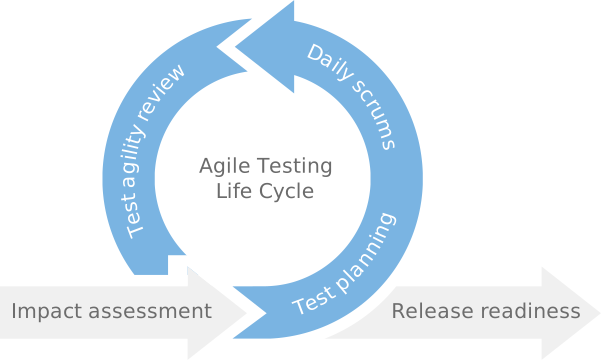
Agile Testing Life Cycle

With a traditional testing method, users must provide detailed requirements concerning the intended software beforehand. However, agile testing gives them the flexibility to share the changes in the software as it follows an iterative approach.

Look at the Agile Testing Life cycle:


Planning Sprints

Agile testing involves breaking down a large complex project into small manageable fragments. A sprint is a pre-agreed period in which the team works on the requirements and completes them within the duration.

The product owner, developers, and testers discuss goals that need to be attained in each sprint. In addition, the team follows a daily scrum where it talks about their assignments and the issues or obstacles blocking the work.

Designing Test Cases

The testing team needs to maintain a correlation with the development team. The development provides functional requirements documents (FRS) and project design documents, and the test team designs the test cases based on those requirements.

A test case details the entire testing technique and verifies quality tests to ensure the test sticks to the process. Next, they hand over the documented test cases to the QA manager and developers for review for defect prevention.

Quality Verification and Validation

Once the development process is complete, the QA team starts the testing process. The team works together following the agile method. This stage is crucial to check and verify the quality of the developed software.

Review Product Stability

Agile follows iterative development, and thus, it accommodates new requirements. Customers often want to change the features, design, or sometimes the entire idea. With the agile method, new changes can be made at any stage of the development process with no complexities.

Regression and Deployment

Once the new changes are added to the product, the QA team conducts manual and automated tests to verify the quality of the existing functionality. After complete verification, the product is deployed.

What Are Agile Best Practices?

Agile testing is flexible, sustainable, and focuses on quality. Look at the best practices to follow for agile testing:

Customer Collaboration

In the agile approach, customer satisfaction is the foremost. The customer plays a crucial role during the entire development life cycle. Customers share their feedback on each sprint and collaborate for changes in the product. Constant communication with the customer offers better customer satisfaction.

On the other hand, in a traditional development method, the customer shares the details before the development process starts and gets to see the project after completion.

Teamwork

In agile testing, teams work together with effective coordination, communication, and mutual support. With a collaborative mindset and teamwork, agile teams release advanced products.

Motivated Individuals

Motivated individuals can make any difficult project happen. They carry a goal in their day-to-day operations and stay focused on the goal. They can also do any task rapidly and thus are a boon for agile testing.

Organized work

The agile teams split their work into small sprints and divided the tasks among team members for an organized approach. They can accomplish the tasks quickly and efficiently when the work is organized.

What Are The Benefits of Agile Testing Methodology?

Look at the benefits that agile testing offers:

  • Flexible to adjust new changes between the sprints.
  • The tasks are divided into small sprints, and each sprint is an individual task, so it helps better organization. In addition, there are fewer chances of errors, and the end products are more efficient.
  • Agile testing enables developers to use reusable indexes for easy development.
  • Since the tasks are divided into smaller fragments, finding and rectifying the errors is easier.
  • The software delivered is of high quality and delivered within the stipulated time.
  • Simple practices like Scrum meetings help maintain greater correlation amongst teams for an efficient end product.
  • Regularly discussing test reports, including errors and solutions, is easier.

Conclusion

The Agile Testing Methodology has revolutionized the way software is tested and delivered. By embracing collaboration, flexibility, and continuous improvement, Agile Testing enables teams to deliver high-quality software that meets customers’ ever-changing needs.

Implementing Agile Testing can be challenging, but the benefits outweigh the effort. If you want to adopt Agile methodologies and improve your software testing practices, our team at UpsquareCS can help. We have extensive experience in implementing agile testing methodologies for businesses across various industries.

Our Agile experts can guide you through the entire process, from training and coaching to implementing best practices and tools. We’ll work closely with your team to understand your needs and tailor our approach to ensure a seamless transition to Agile Testing.

Python Optimization: Tips & Tricks for Optimal Performance

Quick Summary

Python has quickly risen to prominence as a powerful programming language appreciated for its flexibility and ease of use. Whether you’re just starting or have years of expertise, this article will provide the knowledge and skills you need to get the most out of Python.

Choosing the best course of action might be challenging due to the proliferation of available internet information. That’s why, we’ve assembled these top 10 optimizations, techniques, and tips to assist you in dealing with Python’s complexities. Read on if you want to take your Python knowledge to the next level and become an expert programmer.

Top 10 Optimization Tricks for Python

1. Utilize List Comprehensions

Using list comprehensions is a great technique to speed up your Python code. Create new lists quickly and concisely based on predefined criteria using list comprehensions. Instead of writing a for loop and attaching items one at a time, you may write a single line of code using a list comprehension to construct the complete list.

Syntax:

[expression for item in iterable if condition]

Benefits:

  1. They are more readable since they cut down on the required code and are quicker to execute than conventional loops in many cases.
  2. Significant speed increases, particularly when working with bigger datasets or complicated calculations, may be attained using Python’s optimized implementation of list comprehensions.

Use Case:

Consider a scenario where you have a list of numbers and must filter out the even numbers and square the remaining ones. Using a traditional loop approach, you would need multiple lines of code to achieve this. However, with list comprehensions, you can accomplish the same task in a single line, resulting in cleaner and potentially faster code.

Traditional approach using loops

numbers = [1, 2, 3, 4, 5, 6, 7, 8, 9, 10]

result = []

for num in numbers:

if num % 2 != 0:

result.append(num ** 2)

print(result)

# Using list comprehension

result = [num ** 2 for num in numbers if num % 2 != 0]

print(result)

2. Utilize Built-in Functions and Libraries

Python’s extensive library of high-powered and optimized functions reduce the required customs code and boost speed. Leverage Python’s built-in functions and libraries optimized for performance, such as sorted(), map(), and filter() for efficient data manipulation

Syntax: 

result = function_name(argument1, argument2, ...)

Benefits:

By relying on built-in functions, you benefit from Python’s optimized and efficient implementations, saving development time and ensuring better performance.

Use Case:

Rather than implementing a custom sorting algorithm, utilize the sorted() function, which is optimized for performance and provides a sorted version of the input list. This approach simplifies code maintenance and often leads to faster execution.

Input:

numbers = [3, 1, 4, 1, 5, 9, 2, 6, 5, 3, 5]

sorted_numbers = sorted(numbers)

print(sorted_numbers)

Output:

[1, 1, 2, 3, 3, 4, 5, 5, 5, 6, 9]

3. Avoid Global Variables

Global variables in Python are defined outside of any function or class. They are accessible anywhere within the code, including inside functions and classes.

Syntax:

global global_var  # Declare global_var as global within the function

def my_function():

global global_var  # Use the global keyword to modify global_var inside the function

global_var += 1

Benefits

Avoiding global variables in Python is considered a good practice because it enhances code readability, maintainability, and prevents unintended side effects. Instead, you should encapsulate your code within functions and use parameters and return values to pass data between them.

Use Case:

Bad practice: Using global variables

global_var = 10

def increment_global():

global global_var

global_var += 1

def print_global():

print("Global variable:", global_var)

increment_global()

print_global()  # Output: Global variable: 11

Good practice: Avoiding global variables

def increment_local(local_var):

local_var += 1

return local_var

local_var = 10

local_var = increment_local(local_var)

print("Local variable:", local_var)  # Output: Local variable: 11

4. Use Generators

Generators are a powerful feature in Python for creating lazy iterators. They allow you to generate values on the fly rather than storing them all in memory.

Syntax:

def generator_function(arguments):

    # Generator logic

    yield value

Benefits

Generators can improve the performance of your code and reduce memory usage, especially when dealing with large datasets or infinite sequences. Since generators produce values lazily, they are particularly useful when you only need to process a subset of the data at a time.

Use Case

Defining a generator function to generate even numbers

def generate_even_numbers(n):

for i in range(n):

if i % 2 == 0:

yield i

Creating a generator object: gen = generate_even_numbers(10)

Getting the next value from the generator:

next_value = next(gen)

print(next_value)  # Output: 0

5. Use Sets

Sets are a fundamental data structure in Python representing an unordered collection of unique elements. While lists and dictionaries are commonly used, sets offer exceptional performance benefits for operations such as finding unique elements and checking inclusion.

Syntax

Creating A Set: my_set = {1, 2, 3, 4, 5}

Adding Elements: my_set.add(6)

Checking Inclusion: if element in my_set:

print("Element is present in the set")

Benefits

  • Sets offer fast search operations due to their hash-based implementation, making them ideal for tasks like finding unique elements and checking membership.
  • Sets automatically ensure that each element is unique, making them convenient for removing duplicates from a collection.

Use Case

Find unique elements in a list and efficiently check if certain elements are present:

# Using lists

my_list = [1, 2, 3, 4, 5, 1, 2, 3]

unique_elements = list(set(my_list))

if 6 in unique_elements:

print("Element 6 is present")

else:

print("Element 6 is not present")

# Using sets directly

my_set = {1, 2, 3, 4, 5}

if 6 in my_set:

print("Element 6 is present")

else:

print("Element 6 is not present")

6. Optimize String Concatenation

Optimizing string concatenation is important for improving the performance of Python code, especially when dealing with large strings or frequent concatenation operations. Instead of using the + operator for concatenation, which creates new string objects every time, consider using more efficient alternatives like the str. join() method or f-strings.

Syntax

Using str.join() method: result = separator.join(iterable)
Using f-strings: result = f"String with {variable}"

Benefits:

  • Both the str. join() method and f-strings offer better performance than using the + operator for string concatenation, especially when concatenating multiple strings.
  • These methods reduce memory overhead by minimizing the creation of intermediate string objects, resulting in improved memory usage.

Use Case:

Concatenate a list of strings into a single string

# Using + operator for concatenation

result = ""

for word in words:

result += word

# Using str.join() method

result = "".join(words)

# Using f-strings for string formatting

name = "John"

age = 30

result = f"My name is {name} and I am {age} years old."

7. Use Cython

Cython is a powerful tool that allows you to write Python-like code with C-like performance. By compiling Python code into C extensions, Cython can significantly improve the performance of your code, especially for numerical computations and performance-critical tasks.

Syntax:

  1. Writing Cython code involves creating .pyx files containing Python-like code with type annotations.
  2. You then compile the .pyx files using the Cython compiler to generate C code.
  3. Finally, you compile the generated C code using a C compiler (such as GCC or Clang) to produce a shared object (.so) or a dynamic link library (.dll) that can be imported and used in Python.

Benefits

  • Cython-compiled code runs at C-like speeds, offering significant performance improvements over pure Python code, especially for numerical computations and tight loops.
  • Cython seamlessly integrates with existing Python codebases, allowing you to optimize specific code sections while maintaining overall compatibility with Python.

Use Case:

Consider a scenario where you have a computationally intensive task, such as calculating the sum of squares of a large array of numbers:

Pure Python implementation

def sum_of_squares(numbers):

total = 0

for num in numbers:

total += num ** 2

return total

By utilizing Cython, you can enhance the performance significantly:

Cython implementation (sum_of_squares.pyx)

def sum_of_squares_cython(numbers):

cdef long total = 0

cdef long num

for num in numbers:

total += num ** 2

return total

8. Profile and Optimize

Use tools like cProfile.run() to profile its execution and identify bottlenecks. After profiling, analyze the results to identify the functions or parts of your code that consume the most time.

Apply techniques like loop minimization, avoiding redundant calculations, and optimizing I/O operations to improve efficiency. Profile the optimized code again to measure performance improvements.

Iterate on the optimization process by identifying additional areas for improvement and refining your code further.

Syntax

import cProfile

def your_code_to_profile():

# Your code to profile here

cProfile.run('your_code_to_profile()')

Final Thoughts

Optimizing Python code requires expertise, attention to detail, and continuous improvement. By implementing the right strategies and leveraging the latest tools and techniques, you can deliver high performance to end users.

At Upsquare, our experienced developers are well-versed in the latest Python optimization techniques, ensuring your applications run faster, smoother, and more reliably. Contact us today to learn how we can help optimize your Python projects and drive your business forward.

ORM vs. Native SQL: Choosing the Right Database Querying Approach

Quick Summary

As a solution architect or a senior developer, one of the crucial decisions you’ll often face in designing applications is how to interact with the database efficiently. Two primary approaches for querying databases are Object-Relational Mapping (ORM) and Native SQL. Both have advantages and disadvantages, and selecting the appropriate one depends on various factors, including the specific use case and the nature of the application architecture.

In this blog post, we’ll delve into characteristics, pros, and cons of both approaches and discuss when to choose one over another while exploring how Domain-Driven Design (DDD) principles relate to this decision-making process.

Object-Relational Mapping (ORM):

ORM frameworks, such as Hibernate (for Java), Entity Framework (for .NET), and SQLAlchemy (for Python), provide a higher-level abstraction over database operations. Instead of writing raw SQL queries, developers work with objects and classes, and the ORM handles the translation between these objects and the database tables.

Advantages of ORM:

  • Productivity: ORM simplifies the development process by reducing the boilerplate code required for database operations. Developers can focus on business logic rather than database interactions.
  • Portability: ORM frameworks often provide database abstraction layers, allowing developers to switch between different database systems without rewriting significant portions of the codebase.
  • Maintenance: ORM abstracts away the database-specific implementation details, making it easier to refactor or modify the underlying database schema without affecting the application code.

Disadvantages of ORM:

  • Performance Overhead: ORM frameworks may introduce performance overhead due to the abstraction layer and the need for additional processing to translate object-oriented operations into SQL queries.
  • Complexity: ORM mapping configurations and behaviors can become complex, especially for complex data models or advanced database operations, leading to potential performance bottlenecks or unexpected behavior.
  • Limited Control: ORM frameworks may not always expose all database features or optimizations, limiting the developer’s ability to fine-tune queries for performance.

Native SQL:

Native SQL involves writing SQL queries directly to interact with the database without relying on an abstraction layer provided by an ORM framework.

Advantages of Native SQL:

  • Performance: Native SQL allows developers to optimize queries for performance, leveraging database-specific features such as indexes, stored procedures, and query hints.
  • Flexibility: Developers have complete control over the SQL queries, enabling them to write complex queries tailored to specific use cases or database optimizations.
  • Transparent: With Native SQL, developers must clearly understand the database interactions, which can be beneficial for troubleshooting performance issues or debugging complex queries.

Disadvantages of Native SQL:

  • Boilerplate Code: Writing raw SQL queries can lead to verbose code, especially for CRUD (Create, Read, Update, Delete) operations and mapping the result sets to application objects.
  • Portability: Native SQL queries are often tied to a specific database system, making it challenging to switch between databases without rewriting significant portions of the codebase.
  • Maintenance: Changes in the database schema may require manual updates to the SQL queries, potentially introducing maintenance overhead, especially in large codebases.

Choosing the Right Approach:

The decision between ORM and Native SQL depends on various factors, including:

  • Complexity of the Data Model: For simple CRUD operations on straightforward data models, ORM can provide productivity benefits. However, for complex data models with intricate relationships or performance-critical queries, Native SQL might be more suitable.
  • Performance Requirements: If the application has strict performance requirements or deals with large datasets, Native SQL allows for fine-tuning queries and leveraging database optimizations.
  • Developer Skill Set: Consider the expertise of your development team. Developers familiar with SQL may prefer Native SQL for its flexibility and control, while those with experience in ORM frameworks may find it more productive.

Domain-Driven Design (DDD) Consideration:

In Domain-Driven Design (DDD), the choice between ORM and Native SQL aligns with the principles of focusing on the domain model and business logic. ORM can be beneficial for mapping domain entities to database tables and simplifying domain-driven development, especially for CRUD operations on aggregates. However, for complex domain logic or performance-critical operations within domain services, Native SQL might offer better control and optimization opportunities.

In conclusion, both ORM and Native SQL are valid approaches to database querying, each with its advantages and disadvantages. Understanding the specific requirements, performance considerations, and developer preferences will guide you to choose the ideal application architecture. Whether you opt for ORM or Native SQL, the ultimate goal is to ensure efficient database interactions while maintaining code maintainability and performance.

Ready to take your software projects to new heights? Discover the perfect balance between ORM and Native SQL with UpsquareCS. Our expert developers can help you optimize your database performance and streamline your applications.

We create high-performance, scalable solutions tailored to your unique needs. Reach out to us today to learn more about our services and how we can supercharge your software development journey!

Maximize Productivity: Automate Your Application Development Lifecycle

Quick Summary

In the fast-paced world of software development, efficiency is king. Every missed deadline or buggy deployment erodes trust and costs valuable time. Businesses need to be able to develop and deploy applications quickly and efficiently. Manual processes can be slow, error-prone, and difficult to scale. Automation can help businesses overcome these challenges by automating repetitive tasks, such as building, testing, and deploying applications.

So, read the blog to explore the power of automation to improve the efficiency, speed, and quality of your application development and deployment processes.

Software Development Automation For Various Steps of SDLC

Software Development Automation refers to the use of automated tools and processes to streamline and enhance various aspects of the software development lifecycle. This approach aims to improve efficiency, reduce manual intervention, and accelerate the delivery of high-quality software. Here are key aspects of Software Development Automation:

1. Coding Automation

Automated Code Generation: Automated tools generate code snippets or even entire modules based on predefined templates, rules, or specifications. These tools are commonly used across various programming languages and development environments to accelerate the coding process, improve consistency, and reduce manual effort.

Popular Code generation tools:

  • CoPilot: Copilot is an AI-powered code completion tool developed by GitHub in collaboration with OpenAI. It is integrated into GitHub’s text editor and assists developers by providing suggestions and completing code snippets as they write. Copilot leverages machine learning models trained on vast amounts of code from GitHub repositories to offer contextually relevant code suggestions based on the current code context and comments.
  • Yeoman: Yeoman is a robust code generation tool that helps developers scaffold out new projects, modules, and components using pre-configured templates and generators. It supports a wide range of web development frameworks and languages.
  • Swagger Codegen: Swagger Codegen allows developers to automatically generate client libraries, server stubs, and API documentation from Swagger/OpenAPI specifications. It supports multiple programming languages and frameworks, making it easier to build and integrate APIs.

2. Testing Automation

Testing processes, including unit testing, integration testing, and end-to-end testing, can be automated to quickly identify and address issues, improving software quality.

Popular Automation Testing tools:

  • JUnit: JUnit is a popular Java-based testing framework used for unit testing. It provides annotations and assertions to simplify the writing and execution of test cases for Java applications.
  • TestNG: TestNG is another Java-based testing framework that provides more advanced features compared to JUnit, such as parameterized testing, dependency testing, and parallel test execution.
  • Selenium: Selenium is a widely used open-source automation testing tool for web applications. It supports various programming languages such as Java, Python, and C#, and enables testers to automate web browsers for functional testing across different platforms and browsers.
  • Appium: Appium is an open-source automation tool for testing mobile applications across different platforms, including iOS, Android, and Windows. It allows testers to write automated tests using popular programming languages like Java, Python, and JavaScript.

3. Deployment Automation

Continuous Integration (CI): CI tools automate the process of integrating code changes from multiple developers into a shared repository. This ensures that the codebase is regularly checked for errors and conflicts, promoting a more stable development environment. Continuous integration detects integration issues and bugs early in the development process by frequently and automatically testing and validating the codebase.

Continuous Deployment (CD): CD automates the deployment of code changes to different environments, such as testing, staging, and production. The changes made to the program from single or several sources are constantly released for users after putting them through several tests. This accelerates the release cycle and minimizes the risk of deployment errors.

Popular CI/CD Automation tools:

  • GitLab Continuous Integration: GitLab CI is a cloud-based Continuous Integration and Deployment service. Developers can stop worrying about tedious activities like deploying and integrating. AWS support tools include Gi, GitHub, Kubernetes, Docker Swarm, and AWS support tools.
  • Azure DevOps: Azure DevOps offers a streamlined process for creating CI/CD pipelines to Azure, making software development a breeze. With advanced capabilities, Azure DevOps accelerates the development lifecycle with features from Azure Pipelines, Visual Studio Team Services (VSTS), Software Delivery Services, and more. It also makes running Selenium tests easy and efficient. Azure DevOps supports deploying applications to different environments, such as Virtual Machines or Containers.
  • CircleCI: CircleCI allows developers to run tests for code changes by integrating with GitHub with the least effort. CircleCI can automate the build processes for any project with tests written in Python, PHP, Ruby, Node.js, Go, and Java. CircleCI also offers a web-based service to access GitHub Enterprise or for additional customization options for the CI/CD pipeline.
  • Containerization Tools: Containerization tools like Docker and Kubernetes streamline the deployment process by encapsulating applications and their dependencies into containers. This approach ensures consistent environments across various platforms and reduces the time and effort required to deploy and manage applications. Docker simplifies the packaging of applications into containers, while Kubernetes automates the deployment, scaling, and management of containerized applications, enhancing scalability and reliability.
  • Infrastructure-as-Code (IaC) Tools: Infrastructure-as-Code (IaC) tools such as Terraform and AWS CloudFormation automate the provisioning and management of infrastructure resources required by applications. By defining infrastructure configurations as code, these tools enable developers to consistently deploy and manage infrastructure across different environments. This approach reduces the time and effort needed to set up and maintain infrastructure, enhances reproducibility, and minimizes human errors in configuration management.

4. Monitoring and Maintenance Automation

Leveraging automation in post-deployment monitoring allows businesses to observe the app’s behavior in real-time, identifying and addressing potential issues before they escalate into problems. This proactive approach ensures a smoother user experience and enhances the overall reliability and app performance.

Popular Automation tools for Post-deployment Maintenance:

  • Monitoring Tools: Tools like Nagios, Zabbix, and Datadog automatically monitor network services, hosts, and devices in real-time. They analyze performance metrics and alert administrators when anomalies or potential failures occur, enabling proactive troubleshooting and resolution.
  • Log Analysis Tools: Logstash, Splunk, Graylog, and Logmatic are examples of log analysis tools that automatically parse and analyze log files generated by applications and infrastructure components. These tools help identify errors, anomalies, and trends within log data, facilitating faster diagnosis and resolution of issues.
  • Configuration Management Tools: Ansible, Chef, and Puppet are popular configuration management tools that automate the provisioning, configuration, and management of application environments. They ensure consistency across deployment environments by automating tasks such as package installation, file management, and service configuration.
  • Patch Management Tools: Tools like WSUS (Windows Server Update Services) and SCCM (System Center Configuration Manager) automate the process of applying patches, updates, and security fixes to software and operating systems. They help ensure that systems remain up-to-date and protected against known vulnerabilities and exploits.

Final Thoughts

Delivering high-quality software quickly and reliably is no longer an option but a necessity. By leveraging these automation practices and tools, organizations can streamline development, deployment, and post-deployment operations, improve system reliability, and reduce the risk of downtime and service disruptions. Automation enables IT teams to proactively monitor, analyze, and manage application environments, ultimately enhancing the overall performance and availability of deployed applications.

Do you have a groundbreaking application concept ready for launch? Contact Upsquarecs- your trusted outsourcing company, to bring your vision to life.

As a top application development company, we leverage these automation tools to deliver top-notch product development services. Our team of proficient developers ensures streamlined workflows, faster delivery times, and exceptional quality. Boost your application development with cutting-edge automation and dominate the growing tech world.

Cracking the Code: What Makes SaaS Solutions Successful?

Quick Summary

Software as a Service (SaaS) brought a new breed of cloud solutions, replacing bulky software installations and hefty upfront costs. And that’s why The SaaS concept quickly became one of the world’s most widely used corporate practices. Many prominent software companies, including Salesforce, Zoom, and Dropbox, use SaaS business models.

As of 2023, the software as a service (SaaS) market was estimated to be worth around 197 billion U.S. dollars. Projections indicate a continued upward trajectory, with expectations to reach an impressive 232 billion U.S. dollars by 2024.

SAAS solutions are agile, subscription-based applications quickly reshaping the software landscape. However, not all SaaS platforms reach for the skies. So, what makes certain SaaS solutions soar while others struggle to gain traction?

The blog will dissect the key ingredients that propel SaaS platforms to new heights. If you’re gearing up to launch a successful SaaS product, here are a few smart moves to keep in your back pocket.

SaaS VS Conventional software

Affordable: Unlike traditional software that requires upfront investment and installation, SaaS is typically offered on a subscription basis, making it more affordable for businesses of all sizes. Additionally, SaaS applications are hosted in the cloud, eliminating the need for complex IT infrastructure.

Scalable and Flexible: SaaS solutions are designed to scale with your business, seamlessly adapting to your changing needs. You can add or remove users and access your data from anywhere with an internet connection.

Regular updates and Innovation: SaaS providers constantly release new features and updates, ensuring your software is always up-to-date with the latest advancements. This eliminates the need for costly and time-consuming software upgrades.

Improved collaboration and communication: SaaS applications often come with built-in collaboration tools, making it easier for teams to collaborate and share information. This can lead to increased productivity and efficiency.

Enhanced Customer Support: SaaS providers typically offer excellent customer support, ensuring you get the help you need when needed.

What determines SAAS Success?

Many elements and indicators contribute to the success of a SaaS solution. These include the simplicity of installation and usage, the responsiveness of the support staff, and the adaptability of the solution to changes in site traffic.

1. Clearly Understand Your Target Market

Identify a clear and well-defined problem your SaaS product will solve for a specific target audience. The more focused your solution, the better you can cater to the needs of your users.

Conduct thorough market research to understand your target audience’s demographics, needs, and pain points. This will help you tailor your product features and messaging to resonate with them.

2. Build a Minimum Viable Product (MVP)

An MVP is your solution with just the right number of features for your audience.

Instead of aiming for a fully-fledged product launch, prioritize creating a Minimum Viable Product (MVP) that addresses the core problem for your target audience. This allows you to gather early user feedback and iterate quickly based on their needs. MVP success criteria include customer acquisition, retention, engagement, and revenue generation.

Actively solicit feedback from your early users through surveys, interviews, and beta testing. Use this feedback to refine your product and ensure it meets their needs and expectations. For instance, Instagram started as a simple photo-sharing app and iterated based on gathered user feedback.

3. Design for Usability and User Experience (UX)

Make your SaaS product easy to learn and use with a clean and intuitive interface. Users should be able to understand and navigate your product without extensive training. Pay attention to every aspect of the user experience, from onboarding to ongoing use. Strive to create a seamless and enjoyable experience that keeps users returning for more.

4. Market Effectively

Articulate the unique value proposition of your SaaS product and how it benefits your target audience. When marketing, remember the problem your product solves for the target audience. Keep your message clear for an immediate connection. This will help you attract potential customers and differentiate yourself from competitors.

Utilize a mix of marketing channels, such as content marketing, social media marketing, and paid advertising, to reach your target audience and generate leads.

5. Offer Outstanding Customer Support

Prioritize customer satisfaction. Make it easy for your customers to get help by offering multiple support channels, such as email, phone, and live chat. Go the extra mile to ensure your customers are satisfied with your product and support. Address their concerns promptly and professionally, and be proactive in providing solutions.

6. Track, Monitor and Improve

Monitor key performance indicators (KPIs) such as user engagement, churn rate, and customer satisfaction. This data will help you identify areas for improvement and track your progress over time.

Continuously seek opportunities to improve your product and stay ahead of competition. Be open to new technologies and trends, and be willing to adapt your product accordingly.

One of the prime examples is Netflix that measures product success meticulously. The metrics they use to track the results include user engagement, customer retention, and revenue generation.

Key Metrics for Measuring SaaS Success:

Measuring the success of a SaaS product involves tracking various key metrics that provide valuable insights into its performance and user satisfaction. Here are some essential metrics commonly monitored:

1. Churn Rate:

The percentage of customers who cancel or stop using the SaaS product over a specific period. High churn rates can indicate dissatisfaction or issues with the product, customer support, or market fit.

Churn Rate Formula:

Customers leaving business/total number of customers acquired *1004.

Suppose you get 100 customers, and 5 of them leave your business. So, the SaaS churn rate will be 5/100= 0.05*100= 5%.

Tips to Improve SaaS Churn Rate:

  • Gather customer feedback about your service to improve and retain more customers. 
  • Analyze competitors and offer some unique features that your peers are not offering.
  • Deliver what you have promised.

2. Net Promoter Score (NPS):

A measure of customer satisfaction based on the likelihood of users recommending the product to others. NPS helps gauge customer loyalty and satisfaction, providing insights into the product’s perceived value.

Tips to Improve NPS:

  • Deliver what customers demand.
  • Connect with customers personally.
  • Improve based on feedback.

3. Customer Acquisition Cost (CAC):

The total cost incurred to acquire a new customer, including marketing, sales, and onboarding expenses. CAC helps evaluate the efficiency of your marketing and sales strategies for revenue generation.

CAC Formula:

CAC = Total Marketing + Sales Expenses / No. of New Customers Acquired

Tips to Improve CAC:

Optimize your digital touchpoints, web or mobile app, etc. 

Boost the value proposition offered to users.

Use CRM to optimize customer relations and satisfaction.

4. Monthly Recurring Revenue (MRR):

The predictable and recurring revenue generated by the SaaS product on a monthly basis. MRR reflects the stability and growth of the subscription-based business model.

MRR Formula:

MRR = Number of customers * Payment per month

Tips to Improve MRR:

  • Boost monthly customers. 
  • Reduce churn rate. 
  • Deliver solutions to their pain points.

5. Customer Lifetime Value (CLV):

The total revenue a company expects from customers throughout their relationship. CLV helps understand customers’ long-term value and guides marketing and retention strategies.

CLV Formula:

CLV = (1 / Churn Rate) * ARPA

Tips to Increase CLV:

  • Provide a high value through the product to retain customers’ lifetime loyalty. 
  • Boost repeat purchases. 
  • Upsell products and services. 
  • Promote annual billing for customers. It encourages them to pay the total cost upfront, boosting your profits.

6. Conversion Rate:

The conversion rate is the percentage of website visitors who complete a desired action, such as a purchase or sign-up. A higher conversion rate indicates better success in achieving goals.

Conversion Rate Formula:

  • Conversion Rate = Number of Orders / Number of Visitors

Tips To Improve CR:

  • Improve website design. 
  • Give discounts and coupon codes.

Conclusion

The SaaS journey is a marathon, not a sprint. Achieving product-market fit takes time and dedication. Patience and persistence are your compass, guiding you through detours and setbacks. Overnight success stories are the exception, not the rule.

Building a SaaS product that resonates with customers takes time, but the right partners can turn the wait into a harmonious journey. Being a leading SAAS development company, we understand the nuances of building software that resonates deeply with its audience.

Our team of seasoned professionals breathes life into SaaS dreams, guiding you through every step of the process – from identifying the perfect niche to achieving that product-market fit.

So, if you’re ready to develop a SaaS product that wins hearts (and subscriptions!), let’s chat. Contact us today, and let’s harmonize your SaaS success!